

How to Use the Test Card
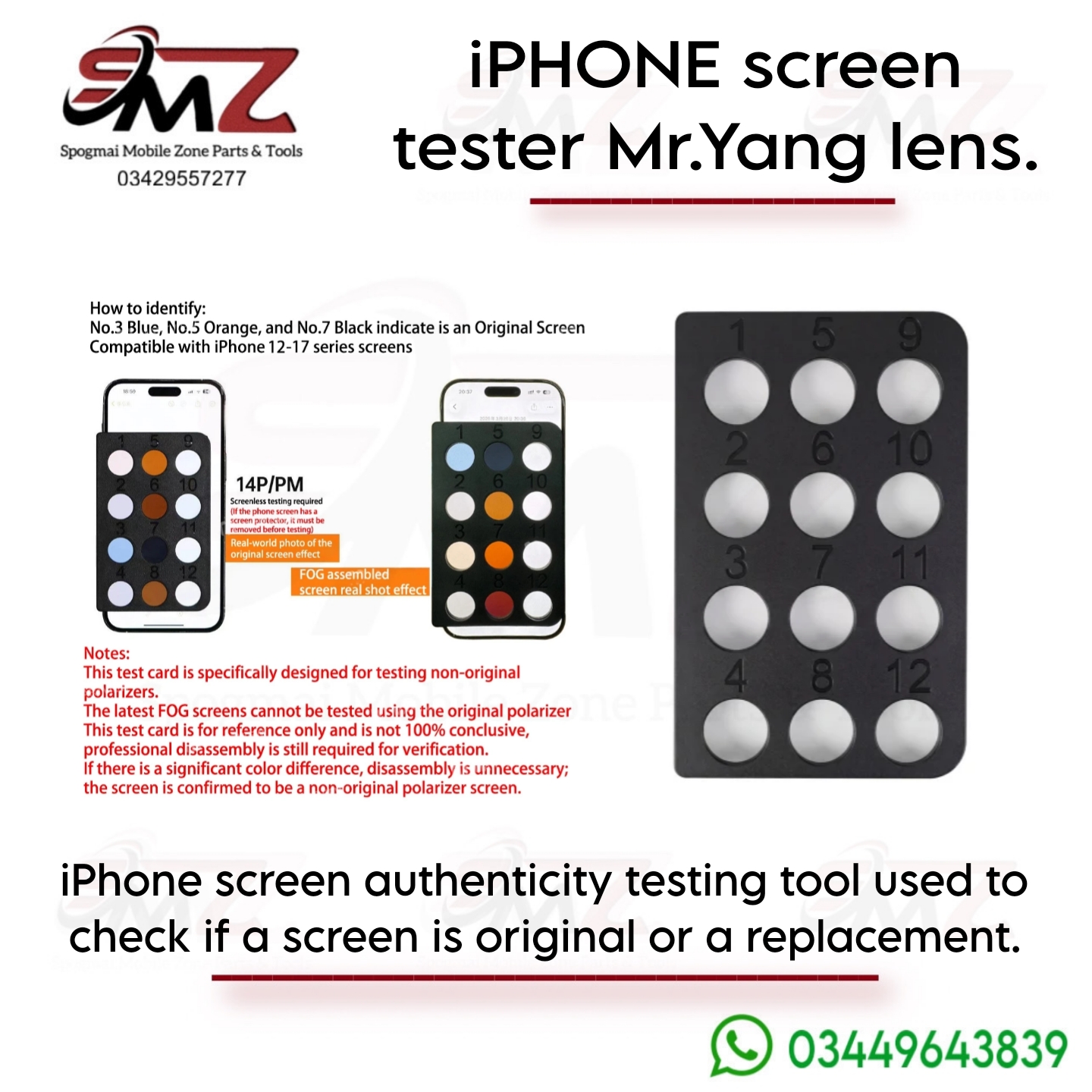
- Prepare the Device: Power on the iPhone and pull up a completely solid, blank white screen background (using the Notes app or a blank browser tab).
- Remove Screen Protectors: If the device has a tempered glass or plastic screen protector, it must be completely removed before testing to avoid distorted optical results.
- Align the Card: Place the rectangular test plate flat directly over the illuminated screen area.
Reading the Diagnostic Color Results
When placed against a genuine original screen display, specific circles on the matrix will filter light into a highly distinct code pattern:
- 🟢 Circle No. 3: Turns Blue.
- 🟠 Circle No. 5: Turns Orange.
- ⚫ Circle No. 7: Turns Black (or very dark blue).
If you overlay this lens and observe missing colors, random gray patches, or completely scrambled color positions across the dots, the display is confirmed to be an aftermarket or non-original replacement screen.
Crucial Usage Notes
- FOG Screen Limitations: The latest FOG (Film-on-Glass) assembled aftermarket screens behave differently and might not throw the standard replacement colors under this specific polarized card.
- Not 100% Conclusive: This tool serves as a rapid, non-invasive benchmark. For absolute verification, technicians rely on matching physical structural serials or reading internal chip micro-data.




Reviews
There are no reviews yet.