

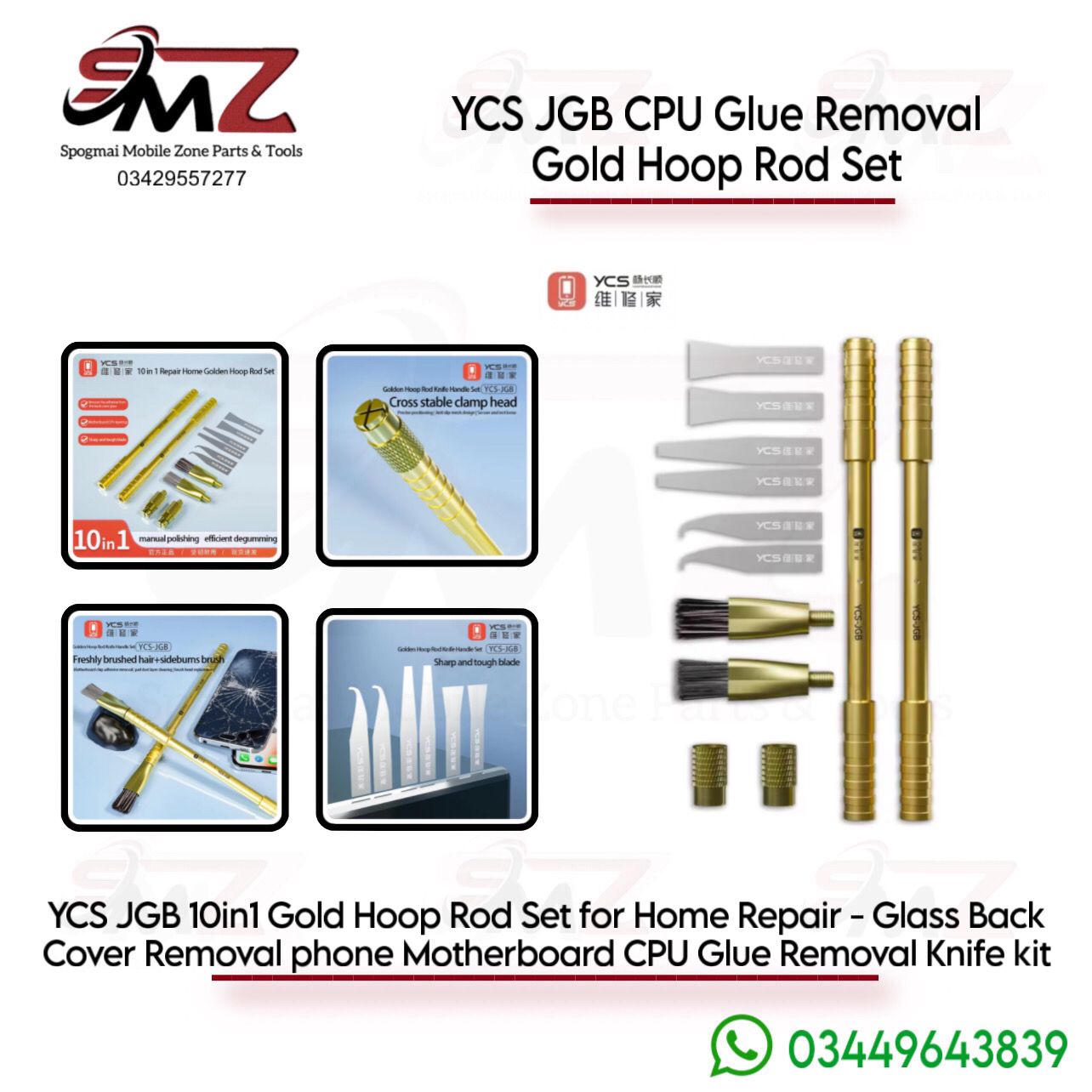
Kit Overview & Box Contents
The package typically includes:
- 2x Aluminum Handles: Features a cross-shaped chuck and an anti-slip grid design to keep blades firmly locked in place without wobbling.
- 6x Ultra-Thin Precision Blades: Varied shapes crafted from high-precision steel used for scraping adhesive, circuit cutting, or prying up the CPU.
- 2x Cleaning Brushes: Includes steel and bristle brush heads to sweep away leftover glue crumbs and solder residue without scratching surfaces.
Step-by-Step CPU Glue Removal Process
To cleanly remove black or white underfill adhesive around and under a smartphone CPU without damaging the PCB pads, follow this standard technician workflow:
1. Take a Reference Photo
Before starting, take clear pictures of the surrounding components from different angles. If you accidentally displace a nearby resistor or capacitor with your blade, you will know exactly where it belongs.
2. Pre-Heat the Motherboard
Do not attempt to scrape glue cold, as this will tear off motherboard traces.
- Secure the board in a repair jig.
- Set your hot air rework station to roughly 200°C–250°C (adjust based on your station and the hardness of the glue) with low airflow.
- Alternatively, use a specialized preheating table like the YCS 2S Heating Platform to evenly warm the board.
3. Clear the Perimeter Resin
- Insert a hook-shaped or angled blade from your YCS JGB kit into the handle.
- While applying gentle heat, slowly trace the outer edge of the CPU to cut and scrape away the hardened perimeter underfill glue. This isolates the chip from surrounding components.
4. Pry and Remove the CPU
- Switch to an ultra-thin flat pry blade (like the YCS-N02 or the layering blades in your kit).
- Elevate your hot air station to desoldering temperature (around 350°C–380°C depending on leaded/lead-free solder profile).
- Gently slip the razor-thin blade underneath the CPU corners. Let the heat melt the BGA solder balls; do not force the blade, or you will lift the pads. Let the chip float up onto the blade.
5. Clean the Residual Glue and Pads
- Apply a liberal amount of rosin flux to the remaining glue on the board.
- Keep the board warm (around 250°C hot air) and use a flat-edge blade from the kit to gently slice off the softened residual chunks of underfill.
- Use the YCS bristle or wire brush attachment with Isopropyl Alcohol (IPA) to scrub away remaining microscopic debris and flux.




Reviews
There are no reviews yet.